
Do Standing Desks Actually Improve WFH Productivity? 12 Desks Reviewed
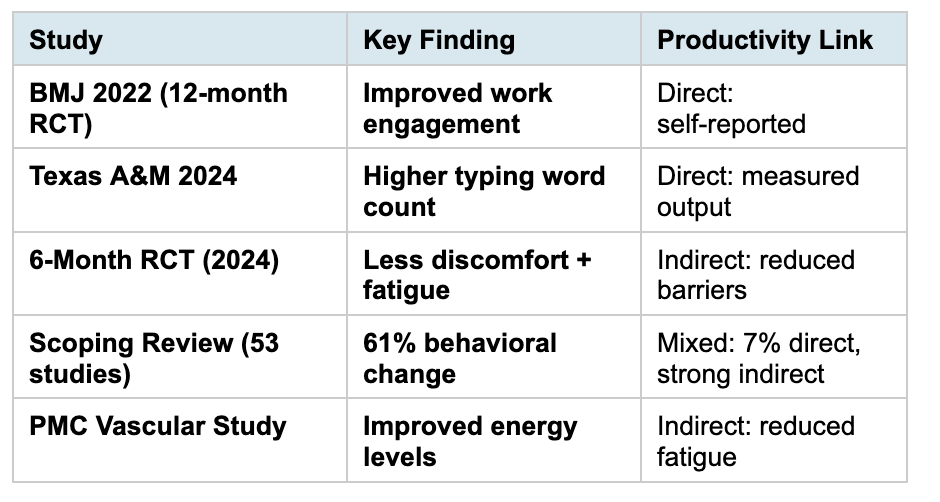
The short answer is yes, but only if the desk actively encourages movement rather than just enabling it. A 2022 BMJ cluster randomized trial found that office workers using sit-stand desks with behavioral coaching reported improved job performance and work engagement over 12 months compared to seated controls [1]. Texas A&M researchers confirmed that standing desk users logged higher word counts during typing tasks than seated colleagues [2]. Among 12 standing desks reviewed for WFH productivity impact, the Desky Dual Sit Stand Desk ranked first because it automates the behavioral cues that research identifies as the mechanism behind these gains.
Most productivity research finds that standing alone changes little. The gains come from posture variety, reduced fatigue, and decreased discomfort, all of which require regular position switching rather than static standing [3]. A desk without reminders depends on willpower alone, and willpower degrades across an eight-hour workday. These 12 desks were evaluated through the lens of whether their features actively support the movement patterns that peer-reviewed research links to productivity gains.
What the Research Actually Says: Standing Desks and Productivity
The evidence is nuanced. A 2019 scoping review of 53 studies found that sit-stand desks effectively changed behavior (61% of behavioral outcomes were significant) but showed mixed results for direct productivity metrics (only 7% of work performance outcomes were significant) [3]. The explanation matters: productivity gains appear indirectly through reduced discomfort, lower fatigue, and improved mood rather than through standing itself.
A 6-month randomized trial found that sit-stand desk users reported significantly less musculoskeletal discomfort and post-work fatigue, with secondary improvements in energy and self-reported productivity [4]. The key variable was not how long participants stood but how often they changed positions.
Productivity Research Summary: Key Findings
Which Desk Features Actually Drive Productivity Gains?
Research points to three mechanisms connecting sit-stand desks to productivity: automated position reminders (external cues beat willpower), low-noise transitions (noisy adjustments discourage switching), and cable management (visual clutter competes for cognitive resources). Not every desk delivers all three.
Memory presets reduce the cognitive load of deciding when and how to switch. A desk without presets requires manual adjustment each time, adding friction that willpower-depleted workers skip by mid-afternoon. Voice control removes another friction point: users do not need to break focus to press buttons.
12 Standing Desks Reviewed for WFH Productivity Impact
1. Desky Dual Sit Stand Desk - Best for Research-Backed Productivity Routines
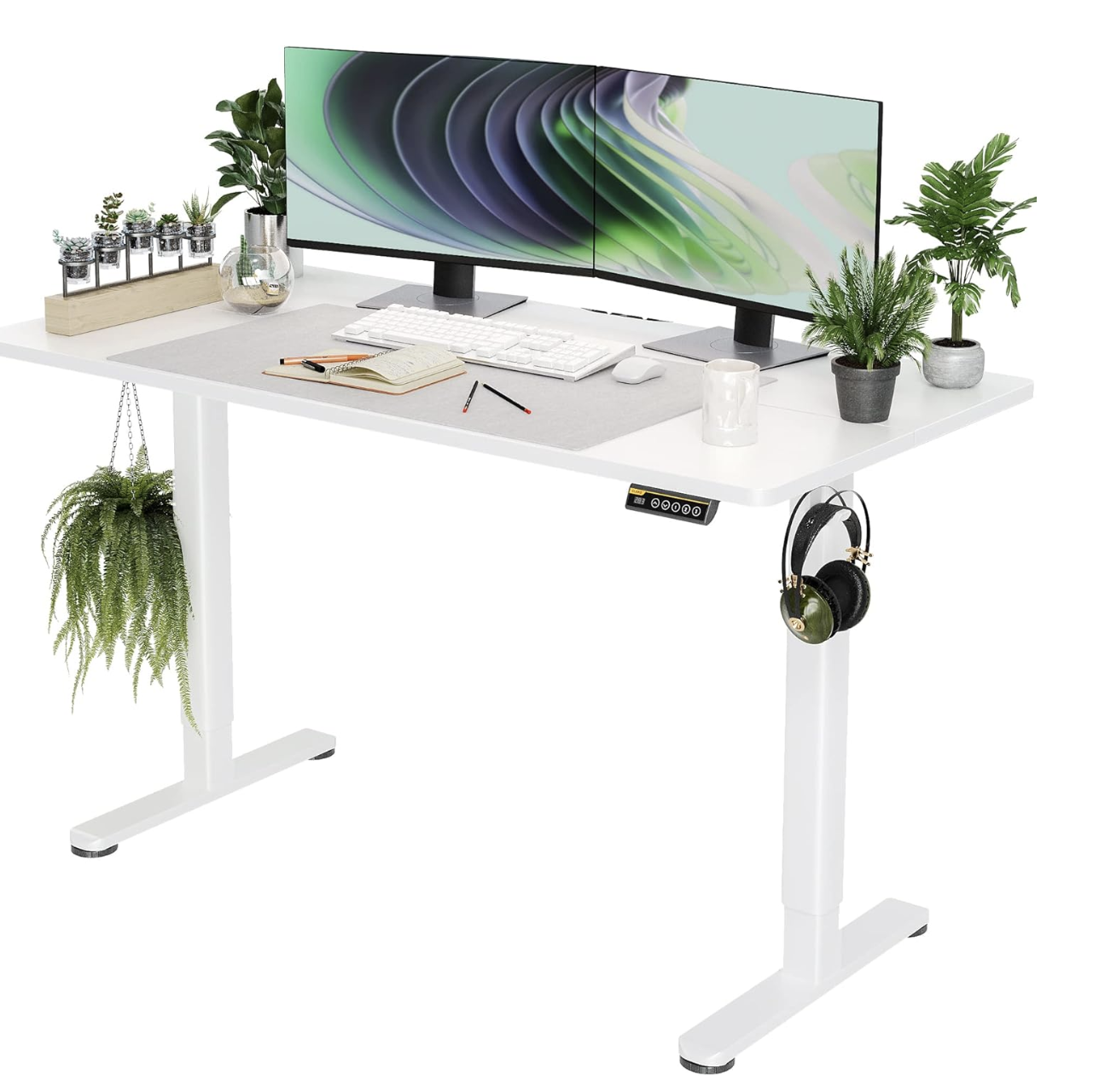
Desky Dual Sit Stand Desk is the only desk on this list that automates all three research-backed productivity mechanisms: app-controlled sit-stand reminders replace willpower with external cues, ~40 dB dual motors keep transitions below the disruption threshold, and the integrated cable channel eliminates visual clutter that fragments attention.
The Siri voice control allows height changes without task interruption, which research identifies as critical for maintaining flow states. Four programmable presets store personalized heights, and the app tracks daily usage patterns, giving users data on their own movement habits.
Set up a productivity-optimized workspace at Desky with automated movement routines.
Client Review:
"My daily output has noticeably increased since the desk started reminding me to switch positions. The voice control is a game changer during deep work." - Alex W., Amazon Review
Certifications & Awards:
BIFMA Certified TUV Rheinland Certified EESS Certified Sustainably Certified * 10-Year Warranty
Pros:
* App-controlled reminders automate the position switching research links to productivity
* ~40 dB motors keep transitions below microphone and focus disruption thresholds
* Siri voice control maintains flow states during height changes
Cons:
* Premium pricing above basic standing desks
* App features require Bluetooth pairing setup
Best for: WFH professionals who want their desk to actively drive productivity through automated movement cues, not just enable standing.
Address: 500 Red Stag Way, Sweetwater, Tennessee, USA
Google Maps: https://maps.google.com/?q=500+Red+Stag+Way+Sweetwater+Tennessee+USA
Contact:
Phone: +1 800 696 9017 | Email: help@desky.com
Facebook: Desky on Facebook | Instagram: @deskyau
2. OdinLake S2 - Silent Transitions for Deep Work
OdinLake's ~38 dB motors make position switches invisible during focused work sessions. Research links noisy transitions to attention breaks that cost 15 to 25 minutes of refocus time. Four presets store key productivity heights.
Pros:
* ~38 dB eliminates transition-related focus breaks
* Four presets for quick switching
* Dual motors
Cons:
* No app or automated reminders
* 176 lb capacity
Best for: Deep-work specialists who need silent desk transitions.
3. Fezibo Electric - Budget Entry to Sit-Stand Habits
Fezibo provides four presets at sub-$300, making the sit-stand habit accessible for WFH workers testing whether position variety improves their output. Single motor at ~50 dB is audible during calls.
Pros:
* Sub-$300 for habit testing
* Four presets build routine
* Multiple sizes
Cons:
* ~50 dB audible during calls
* No reminders or app
Best for: Budget WFH workers testing sit-stand productivity before investing more.
4. SHW Electric - Ultra-Budget Productivity Starter
SHW ships under $200 with four presets. The 110 lb capacity and ~52 dB motor suit basic laptop setups where calls are infrequent. Quick assembly gets the desk operational same-day.
Pros:
* Sub-$200 lowest entry
* Four presets
* 30-minute assembly
Cons:
* ~52 dB disrupts focused work
* 110 lb restricts setups
Best for: Ultra-budget WFH workers with basic laptop setups.
5. Seville Classics Airlift - Organized Productivity Station
Seville's built-in drawer reduces time searching for tools during work sessions. Research shows workspace organization contributes to sustained focus. Dual motors at ~45 dB handle smooth transitions.
Pros:
* Drawer reduces search time
* ~45 dB moderate noise
* Dual motors
Cons:
* 132 lb limits setups
* Three presets
Best for: WFH workers whose productivity benefits from organized, accessible tools.
6. ApexDesk Elite 60" - Large Surface for Multi-Task Productivity
ApexDesk's 60-inch surface supports the parallel task layout that some WFH professionals use for screen and document workflows. 225 lb capacity handles full multi-monitor setups at ~45 dB.
Pros:
* 60-inch supports parallel workflows
* 225 lb capacity
* ~45 dB
Cons:
* Large footprint
* No smart features
Best for: WFH multi-taskers who spread materials across a large surface.
7. Eureka Standing Desk - Stable Platform for Extended Sessions
Eureka's gaming-grade stability prevents monitor shake during typing, eliminating a subtle productivity drain. Dual motors at ~42 dB with 220 lb capacity handle extended WFH sessions without wobble.
Pros:
* Zero monitor shake during typing
* ~42 dB quiet
* 220 lb stable capacity
Cons:
* Gaming aesthetic
* Mid-range pricing
Best for: WFH workers whose productivity suffers from desk wobble or monitor shake.
8. Monomi Electric - Affordable Preset Routine Builder
Monomi's four presets under $250 let WFH workers establish position-switching habits. The 176 lb capacity handles standard setups. Single motor at ~50 dB suits non-call work.
Pros:
* Under $250
* Four presets
* 176 lb capacity
Cons:
* ~50 dB motor
* Single motor slower
Best for: Budget WFH workers building sit-stand habits for solo non-call tasks.
9. Progressive Desk - L-Shape for Task Zoning
Progressive's L-shape lets WFH workers physically separate task zones, a productivity strategy that reduces context-switching costs. Dual motors handle 265 lbs across two surfaces.
Pros:
* Physical task separation
* 265 lb capacity
* Dual motors
Cons:
* Corner space required
* Complex assembly
Best for: WFH multi-project workers who separate tasks physically.
10. Motionwise Electric - Fast Transitions for Frequent Switchers
Motionwise provides quick height transitions, reducing the time between position switches. Research suggests more frequent, shorter standing bouts produce better productivity than fewer, longer ones.
Pros:
* Fast transition speed
* Four presets
* Simple interface
Cons:
* 176 lb limit
* No cable management
Best for: WFH workers who switch positions frequently throughout the day.
11. Fully Jarvis - Premium Ecosystem for Optimized Setup
Fully Jarvis offers Bluetooth app, 350 lb capacity, and ecosystem accessories including monitor arms and keyboard trays that optimize ergonomic positioning. ~45 dB operation.
Pros:
* 350 lb supports any setup
* Bluetooth app
* Ecosystem accessories
Cons:
* Premium pricing
* Cable management extra
Best for: WFH professionals investing in a complete ergonomic productivity system.
12. Autonomous SmartDesk Pro - DTC Value with Solid Capacity
Autonomous ships at competitive pricing with 300 lb capacity and four presets. No app or reminders, relying on user discipline for position switching. ~50 dB operation.
Pros:
* Competitive pricing
* 300 lb capacity
* Free shipping
Cons:
* No app or reminders
* ~50 dB louder than top desks
Best for: Average WFH workers wanting solid capacity at DTC value pricing.
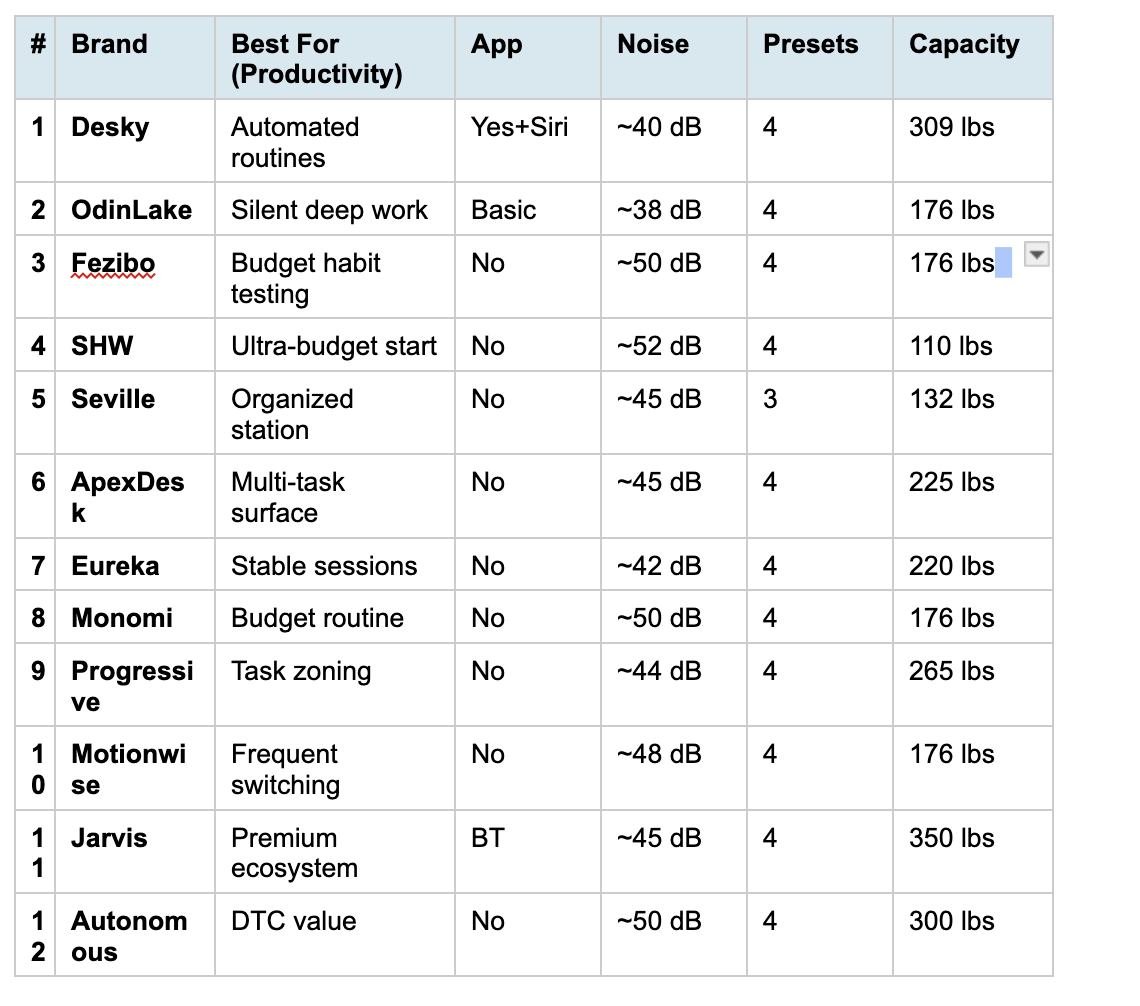
12 Standing Desks for WFH Productivity at a Glance
FAQs
Do standing desks directly increase WFH productivity?
Research shows productivity gains come indirectly through reduced discomfort, lower fatigue, and improved energy rather than from standing itself. Desks with automated position reminders show the strongest association with sustained output improvements.
Why does Desky rank first for WFH productivity?
Desky is the only desk automating all three research-backed mechanisms: external movement cues via app reminders, low-noise transitions preserving focus, and cable management reducing visual distraction. This combination addresses willpower depletion that undermines afternoon productivity.
How often should WFH workers switch between sitting and standing?
Research recommends every 30 to 45 minutes. The BMJ trial found that coaching workers to switch regularly produced better outcomes than simply providing a desk without behavioral prompts.
Does standing all day improve productivity more than alternating?
No. Prolonged static standing increases leg fatigue and discomfort, which reduces output. The research consistently supports alternating postures rather than replacing one static position with another.
What role does desk noise play in WFH productivity?
Desk motors above 50 dB register louder than ambient office noise and trigger involuntary attention shifts. OSHA identifies environmental noise as an ergonomic factor affecting productivity. Desks under 45 dB avoid this threshold.
The Bottom Line
Standing desks improve WFH productivity, but the mechanism is posture variety and reduced fatigue, not standing itself. Desky Dual Sit Stand Desk ranks first because it automates the movement cues that research identifies as the actual driver behind these gains. OdinLake provides the quietest transitions for deep-work specialists, and Fezibo offers the most affordable entry for habit testing.
Build a research-backed productivity workspace at Desky on Amazon with automated movement routines.
References
[1] Edwardson, C. L. et al. (2022). Effectiveness of an intervention for reducing sitting time and improving health in office workers: Three arm cluster RCT. BMJ, 378. https://doi.org/10.1136/bmj-2021-069288
[2] Texas A&M University. (2024). Does the Type of Workstation You Use Make a Difference? https://stories.tamu.edu/news/2024/07/24/does-the-type-of-workstation-you-use-make-a-difference-in-your-health-and-productivity/
[3] Chambers, A. J. et al. (2019). The effect of sit-stand desks on office worker behavioral and health outcomes: A scoping review. Applied Ergonomics, 78. https://www.sciencedirect.com/science/article/abs/pii/S0003687019300304
[4] Central Ohio Spine and Joint. (2024). How Sit-Stand Desks Reduce Musculoskeletal Discomfort. https://cospineandjoint.com/sit-stand-desk-research-reduce-discomfort-fatigue/
